IR Database
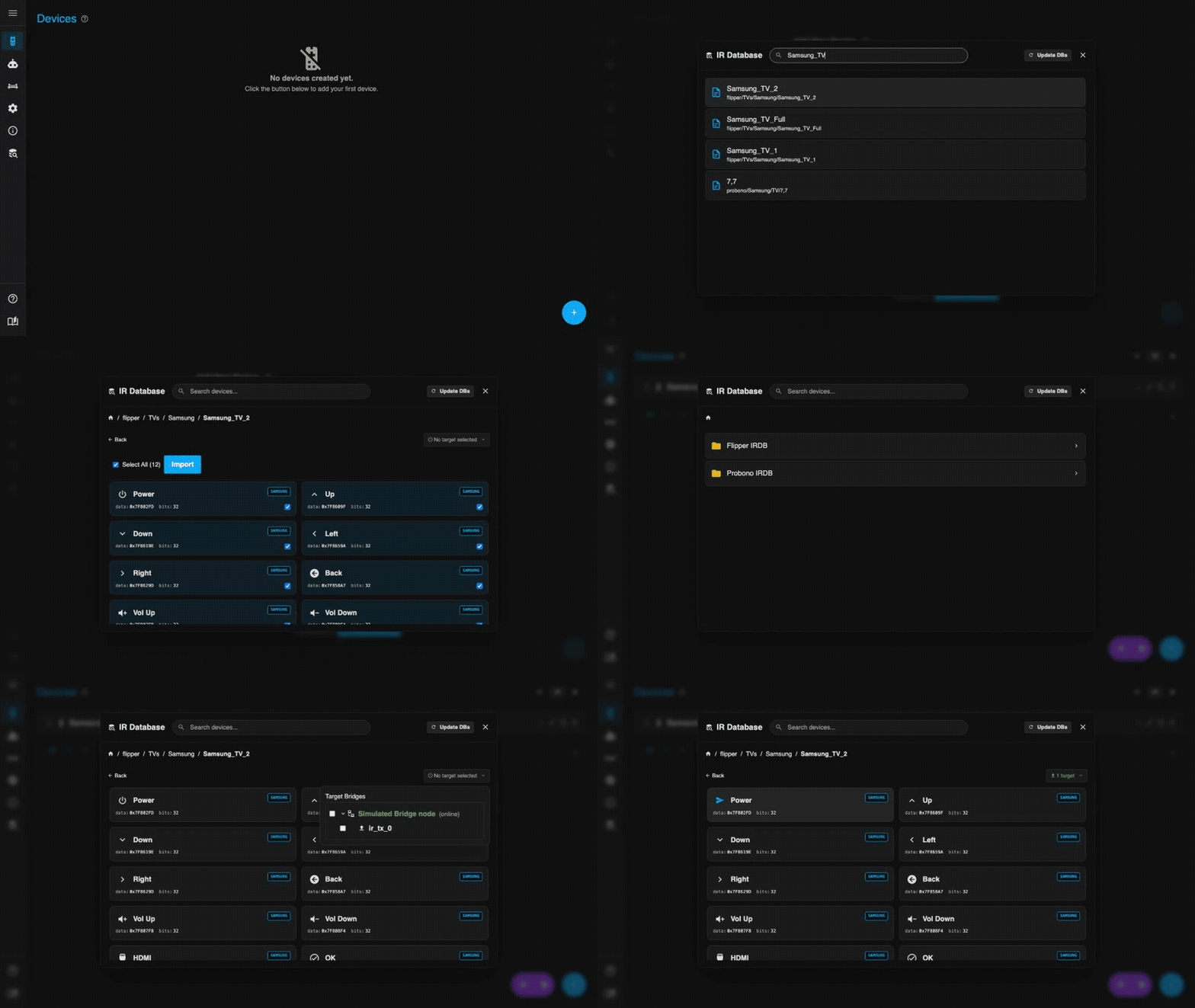
IR2MQTT includes a comprehensive database of IR codes sourced from the Flipper Zero and Probono communities. You can use this to find codes for your devices without needing a physical remote.
One-time download required
The database files are not bundled with IR2MQTT to keep the image size small. Go to IR Database → Download in the UI to fetch them. This only needs to be done once; the data is stored in the application's SQLite database (/data/ir2mqtt.db).
Finding Codes
- Search — Type the brand or model name (e.g.
Samsung TV) into the search bar. Results appear from both databases simultaneously. - Browse — Navigate the folder tree: Brand → Device Type → Model. Useful when you don't know the exact model name.
- Test before importing — Hover over any button in the browser and click the send icon to transmit the code immediately. Use this to confirm the code works with your device before adding it.
Importing Codes
- Find your device in the database.
- Select the buttons you want (or use Select All).
- Click Import into Device and choose the target device from the dropdown.
The imported buttons are added to the device without overwriting existing ones. Duplicate button names are automatically suffixed (e.g. Power_1).
Database Sources
| Source | Coverage | Format |
|---|---|---|
| Flipper Zero | 1000+ devices, broad brand coverage | .ir files |
| Probono | Deep coverage for AV equipment | Custom format |
Code compatibility
Database codes are community-contributed and may not work for every revision of a device. If a code doesn't work, try another entry for the same brand, or learn the code directly from your physical remote using Learning Mode.
Incomplete import coverage
Not all codes from these databases can be imported — entries using unsupported protocols or non-standard formats are silently skipped. After an update, the UI shows how many codes were imported and how many were skipped. This is a work in progress.
If you notice a device where most or all buttons are missing after import, please open an issue on GitHub with the device name and the exact path in the database browser (e.g. Probono → Denon → AV Receiver → AVR-X1600H).
Updating the Database
Re-run the download from the UI to fetch the latest community-updated files. Existing learned codes on your devices are never modified by a database update.
How Code Conversion Works
The Flipper Zero and Probono databases use their own file formats and protocol names. IR2MQTT converts these into its internal format on import — but this conversion is not lossless.
Protocol Mapping
Both source formats use different protocol names than IR2MQTT internally. These are mapped automatically:
| Source name | Maps to |
|---|---|
necext, nec42, nec-y1, nec-y2, nec-y3, nec_ext | nec |
samsung32 | samsung |
sirc, sirc12, sirc15, sirc20 | sony |
kaseikyo | panasonic |
rc5x | rc5 |
rc6-m-56 | rc6 |
lg2 | lg |
rc_switch, rcswitch | rc_switch |
dish variants | dish |
Protocols not in this list are passed through as-is, then checked against the list of supported protocols.
Unsupported Protocols
The following protocols exist in the source databases but are not supported by IR2MQTT. Buttons using these protocols are silently skipped during import — they won't appear in the results and no warning is shown:
sharp, rca, sanyo, toshiba (standard variant — toshiba_ac is supported), whynter
If you notice that a device has fewer buttons after import than expected, this is the most likely cause.
No Carrier Frequency Information
The Flipper and Probono formats do not include the carrier frequency of the IR signal. IR2MQTT assumes 38 kHz for all imported codes. Devices that use a different carrier frequency (e.g. 36 kHz for RC5, 40 kHz for some Sony variants) may not respond correctly even though the code itself is correct.
Pronto hex codes are the exception — they encode the frequency directly and IR2MQTT uses it.
Malformed or Incomplete Entries
Community-contributed database files sometimes contain malformed hex values, missing fields, or unparseable raw timing data. IR2MQTT skips individual buttons that cannot be converted rather than aborting the whole import. There is no per-button error report — if a button is missing after import, it was likely skipped for one of these reasons.
When database codes don't work
If an imported code does nothing, try a different entry for the same brand in the database. If nothing in the database works, use Learning Mode to capture the code directly from your physical remote — learned codes are always exact.